Game Design Challenges - Designing with constraints
Overview
I designed a puzzle-focused side mission chain centered around transporting a block of Obsidian — a unique material that introduced one meaningful constraint
It was Non-magnetic, meaning players couldn’t use the common Tractor Beam block to lift or carry it
This meant the typical “slap on a Tractor Beam block and go” strategy no longer worked.
To complete the missions, our players had to engineer entirely new solutions — using mechanical arms, cages, hinges, or clever wedges to lift and secure the object manually.
Gameplay from theYoutuber Scrapman playthrough of the update that introduced the puzzles I made.
19:33, etc
Design Intent
The goal of this mission chain wasn’t just to create a harder delivery quest, something we had done quite a lot of already, it was to break player assumptions and encourage out-of-the-box problem solving. By designing puzzles around this non-standard object, I pushed players deeper into the core building mechanics and rewarded experimentation over brute force.
While of course brute force will always be possible in some of the puzzles, it wasn' the right answers for all of them.
Outcome
While the response wasn't immedietly heard as these missions appeared at patch for 2.0, it seemed that i achived a design that was lacking in the launch updates, puzzles that forced the player to use their builder to build a solution, to think outside the box...
What was clear was that each community with crafted wildly different builds and approaches. For each one of the new missions. It validated the design choice to take away an expected tool (the magnet) in order to unlock deeper creativity and system mastery.
Example of Tractor Beam block working on a normal cargo
Example of the puzzle block not being attracted to the Tactor beam
Crane vehicle made to lift puzzle object
Drone vehicle made to lift puzzle object
Level Design Challenges - Sub Biomes
The Pioneers update introduced a massive open world that spanned several in-game kilometers. However, due to engine limitations and a relatively short render distance, players couldn’t see key landmarks from far away, which made it easy to get disoriented during exploration.
With such a large map and a limited asset pool, we faced a clear risk: if the environment within a biome looked too uniform, players could easily get lost without constantly checking the minimap. That would hurt immersion and exploration, two core pillars of the update.
To address this, I developed a solution we came to call Sub-Biomes.
Level Design Solution - Sub Biomes
The idea behind Sub-Biomes was simple: just as each major biome (like the Meadows) had its own personality — with distinct terrain textures, traversal challenges, foliage, and asset choices — the sub-biomes would act as variations or remixes of that core identity.
While each sub-biome still used the same general assets and terrain types, I designed them with a unique focus or flavor. One area might lean into mountainous terrain, another might emphasize beaches and lakes, while a third could focus on wide, open fields. This approach allowed us to stretch limited resources while still building a world that felt diverse and readable.


The goal was to ensure that when a player dropped into one of these areas, they could intuitively understand three things:
-
They were in the Meadows biome.
-
They were in a specific part of the Meadows, based on the sub-biome’s personality and traits.
-
They could orient themselves within that sub-biome, thanks to a distinct landmark — something that stood out visually and encouraged exploration.
In the following example, I’ve selected three distinct areas that demonstrate this design in action.
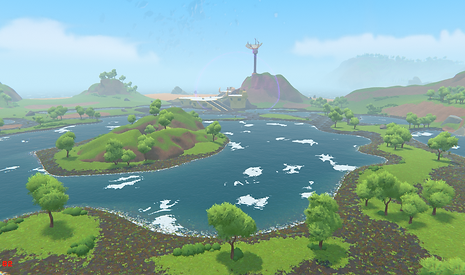
The Wetlands
-
Last area of the Meadows.
-
Used a lot of mud and lakes instead of open grasslands
-
Flatter less mountainous
-
Used final boss of the area as a point of intrest